SocketX Server On-Premise Deployment
Introduction
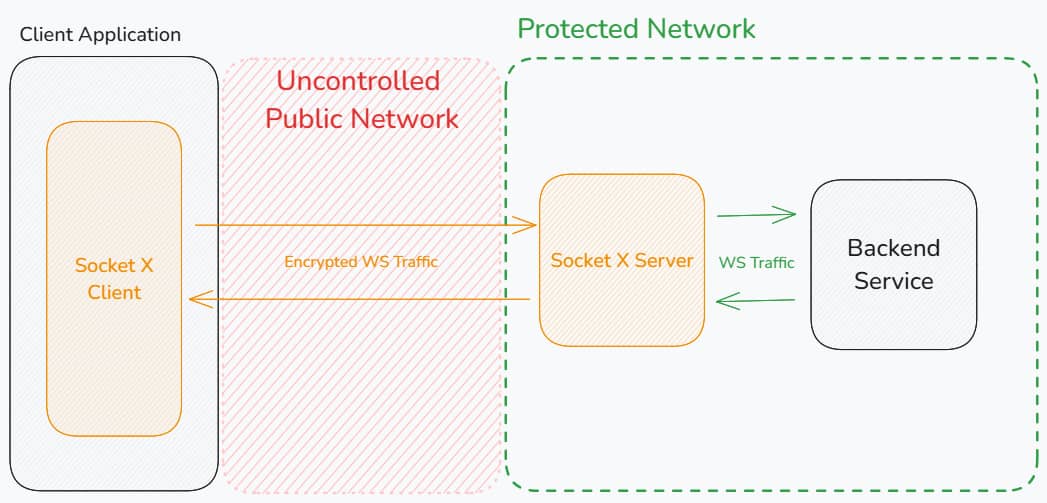
SocketX Server is a WebSocket proxy that terminates SocketX/MTE-protected
connections from SocketX clients, decodes client payloads inside the proxy, and
forwards WebSocket frames to an upstream WebSocket service. The upstream leg is
plaintext when the configured upstream uses ws:// and TLS-protected when it
uses wss://.
SocketX preserves WebSocket text and binary frame semantics while wrapping payloads in the SocketX/MTE protocol between the client and proxy.
Prerequisites
Technical Requirements
- A web or mobile application that communicates with a backend service over WebSockets.
- A backend WebSocket service reachable from the SocketX deployment.
- Docker, Kubernetes, Podman, K3s, Docker Swarm, or another supported container runtime.
- AWS CLI for authenticating to the Eclypses ECR repository.
Credentials
- An AWS Access Key ID and AWS Secret Access Key provided by Eclypses for access to the private container repository.
Deployment Options
SocketX Server is provided as a Docker image and can be deployed on-premise using:
- Docker Run
- Docker Compose
- Kubernetes
- Other container runtimes, including Podman, Docker Swarm, and K3s
1. Configure AWS CLI Access
Configure an AWS CLI profile using the credentials provided by Eclypses:
aws configure --profile eclypses-customer-on-prem
When prompted:
- AWS Access Key ID: enter the ID provided by Eclypses.
- AWS Secret Access Key: enter the secret key provided by Eclypses.
- Default region name:
us-east-1. - Default output format:
json.
2. Pull the Docker Image
Authenticate Docker with the Eclypses ECR repository:
- bash
- PowerShell
aws ecr get-login-password \
  --region us-east-1 \
  --profile eclypses-customer-on-prem \
  | docker login --username AWS \
  --password-stdin 321186633847.dkr.ecr.us-east-1.amazonaws.com
aws ecr get-login-password `
  --region us-east-1 `
  --profile eclypses-customer-on-prem `
  | docker login --username AWS `
  --password-stdin 321186633847.dkr.ecr.us-east-1.amazonaws.com
Pull the image. Replace <version> with the image tag provided by Eclypses.
docker pull 321186633847.dkr.ecr.us-east-1.amazonaws.com/customer/on-prem/socketx-server-go:<version>
Server Configuration
SocketX Server is configured with environment variables.
Required Variables
DOMAIN_MAP- JSON string mapping hostnames to upstream WebSocket targets and allowed origins.
Use the DOMAIN_MAP Builder tool to configure your domain mappings visually and copy a ready-to-use DOMAIN_MAP value.
DOMAIN_MAP Format
{
  "api.example.com": {
    "upstream": "wss://backend.example.com/socket",
    "allowedOrigins": ["https://app.example.com"]
  },
  "*.staging.example.com": {
    "upstream": "ws://staging-backend:8080",
    "allowedOrigins": ["https://*.staging.example.com"]
  },
  "*": {
    "upstream": "ws://default-backend:8080",
    "allowedOrigins": ["*"]
  }
}
Matching order is exact host, subdomain wildcard such as *.example.com, then
global wildcard *. The incoming Host header may include a port, so include
that port in the key or use a wildcard mapping when required.
allowedOrigins is required in practice. Empty or missing origin lists reject
connections. Exact origins include the scheme, for example
https://app.example.com. Origin wildcard entries must begin with *., for
example https://*.example.com.
Optional Variables
| Variable | Default | Description |
|---|---|---|
LISTEN_HOST | 0.0.0.0 | Address the server binds to. |
LISTEN_PORT | 8080 | Port the server listens on. |
LOG_LEVEL | info | trace, debug, info, warn, error, fatal, panic, or disabled. |
MTE_KYBER_STRENGTH | 512 (v1) | 0, 512, 768, or 1024. See version note below. |
MTE_DECODER_WINDOW_SIZE | 1000 | MTE decoder re-sequencing window. |
WS_READ_BUFFER_SIZE | 1024 | WebSocket read buffer size in bytes. |
WS_WRITE_BUFFER_SIZE | 1024 | WebSocket write buffer size in bytes. |
CLIENT_PONG_TIMEOUT | 60 | Seconds allowed to receive client pong. |
CLIENT_PING_INTERVAL | 54 | Seconds between proxy-to-client pings. |
UPSTREAM_PONG_TIMEOUT | 60 | Seconds allowed to receive upstream pong. |
UPSTREAM_PING_INTERVAL | 54 | Seconds between proxy-to-upstream pings. |
WRITE_TIMEOUT | 10 | Seconds allowed for WebSocket writes. |
USE_CONSOLE_LOGS | false | Set to true for human-readable logs. |
MTE_KYBER_STRENGTH defaults to 512 in SocketX Server v1 (the currently released version). v2 (the next version, not yet released) changes the default to 1024.
Minimal Example
DOMAIN_MAP={"*":{"upstream":"ws://example.com","allowedOrigins":["*"]}}
Full Example
DOMAIN_MAP={"*":{"upstream":"ws://example.com","allowedOrigins":["*"]}}
LISTEN_HOST=0.0.0.0
LISTEN_PORT=8080
LOG_LEVEL=info
WS_READ_BUFFER_SIZE=2048
WS_WRITE_BUFFER_SIZE=2048
CLIENT_PONG_TIMEOUT=60
CLIENT_PING_INTERVAL=54
UPSTREAM_PONG_TIMEOUT=60
UPSTREAM_PING_INTERVAL=54
WRITE_TIMEOUT=10
USE_CONSOLE_LOGS=false
Deployment Steps
Option A: Docker Run
- bash
- PowerShell
docker run --rm -it \
  --name socketx \
  -p 8080:8080 \
  -e DOMAIN_MAP='{"*":{"upstream":"ws://example.com","allowedOrigins":["*"]}}' \
  321186633847.dkr.ecr.us-east-1.amazonaws.com/customer/on-prem/socketx-server-go:<version>
docker run --rm -it `
  --name socketx `
  -p 8080:8080 `
  -e 'DOMAIN_MAP={"*":{"upstream":"ws://example.com","allowedOrigins":["*"]}}' `
  321186633847.dkr.ecr.us-east-1.amazonaws.com/customer/on-prem/socketx-server-go:<version>
Option B: Docker Compose
services:
  socketx:
    image: 321186633847.dkr.ecr.us-east-1.amazonaws.com/customer/on-prem/socketx-server-go:<version>
    ports:
      - "8080:8080"
    environment:
      DOMAIN_MAP: '{"*":{"upstream":"ws://example.com","allowedOrigins":["*"]}}'
Option C: Kubernetes
apiVersion: apps/v1
kind: Deployment
metadata:
  name: socketx
spec:
  replicas: 2
  selector:
    matchLabels:
      app: socketx
  template:
    metadata:
      labels:
        app: socketx
    spec:
      containers:
        - name: socketx
          image: 321186633847.dkr.ecr.us-east-1.amazonaws.com/customer/on-prem/socketx-server-go:<version>
          ports:
            - containerPort: 8080
          env:
            - name: DOMAIN_MAP
              value: '{"*":{"upstream":"ws://example.com","allowedOrigins":["*"]}}'
---
apiVersion: v1
kind: Service
metadata:
  name: socketx-service
spec:
  type: LoadBalancer
  selector:
    app: socketx
  ports:
    - protocol: TCP
      port: 80
      targetPort: 8080
kubectl apply -f socketx-deployment.yaml
kubectl get all
kubectl delete -f socketx-deployment.yaml
Testing & Health Checks
- Monitor container logs for the startup message:
Starting server. - Test the echo route:
curl http://<SOCKETX_HOST_OR_IP>:<PORT>/api/socketx-echo?msg=test
Expected response:
{
  "message": "test",
  "timestamp": "<RFC3339 timestamp>"
}
Observability
For dashboards, ship the container's JSON logs to Datadog or New Relic with their agents — both guides include importable SocketX dashboards.
Startup logs include a redacted config object with fields such as listen_addr,
log_level, socketx_version, mte_version, mte_kyber_strength, timeout
values, and buffer sizes.
MTE encryption and decryption event logs include:
connection_idevent_typeduration_mspayload_size_bytespayload_sha256eeidhostoriginupstream_server
Connection close logs include an audit object with connection timing, message
counts, byte counts, total encode/decode time, and WebSocket close information.
payload_sha256 is a hash of plaintext payload bytes at the proxy for
correlation and audit workflows. It is not a standalone compliance certification
or tamper-evidence guarantee.
Troubleshooting
- Invalid configuration
- Check logs for missing or invalid environment variables.
- Verify
DOMAIN_MAPis valid JSON and each entry hasupstreamandallowedOrigins.
- SocketX unreachable
- Verify firewall, routing, Kubernetes service configuration, and container port mappings.
- Origin rejected
- Confirm the browser
Originvalue matches the selected host mapping'sallowedOriginslist.
- Confirm the browser
- Upstream connection fails
- Confirm the configured
upstreamURL and client-providedpathnamecombine into a valid WebSocket URL.
- Confirm the configured
Enable debug logs with LOG_LEVEL=debug.
Security Notes
- The server does not persist WebSocket payloads.
- Runtime environment variables may contain license, registry, or deployment configuration values and should be protected accordingly.
- The current Dockerfile uses a distroless runtime image but does not set an explicit non-root
USER. - Use
wss://upstream URLs when the proxy-to-upstream leg must be TLS-protected.
Costs
Private infrastructure costs are customer-managed. Registry access or commercial terms depend on the agreement with Eclypses.
Maintenance
Routine Updates
- Updated container images are distributed through Eclypses release channels.
Fault Recovery
- Relaunch the SocketX container. Clients reconnect and pair again.
Support
For assistance, contact Eclypses Support:
Monday-Friday, 8:00 AM-5:00 PM MST, excluding holidays.