SocketX on Oracle Cloud Infrastructure
Introduction
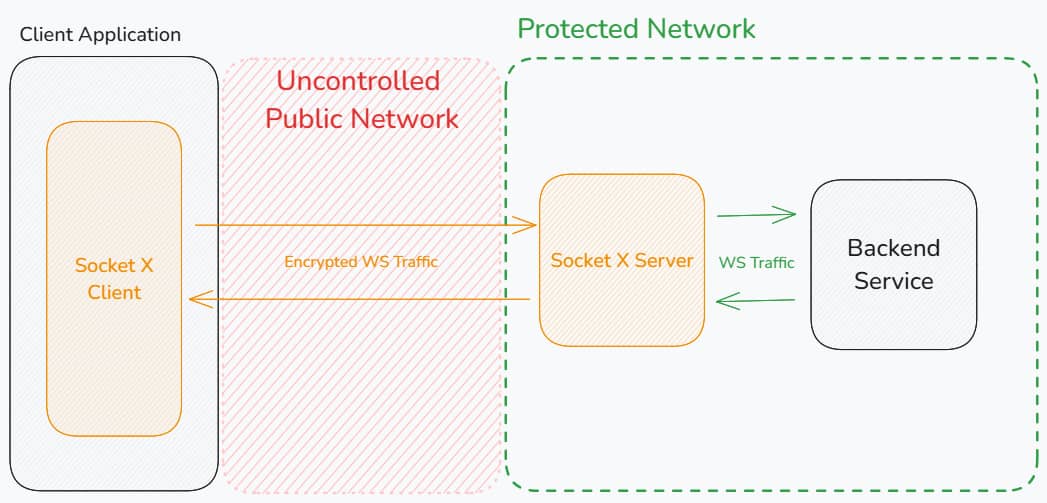
SocketX Server is a WebSocket proxy that terminates SocketX/MTE-protected
connections from SocketX clients, decodes client payloads inside the proxy, and
forwards WebSocket frames to an upstream WebSocket service. The upstream leg is
plaintext when the configured upstream uses ws:// and TLS-protected when it
uses wss://.
SocketX preserves WebSocket text and binary frame semantics while wrapping payloads in the SocketX/MTE protocol between the client and proxy.
This guide covers running SocketX Server on Oracle Cloud Infrastructure (OCI), where the container image is delivered through an Oracle Cloud Marketplace listing under a Bring Your Own License (BYOL) model. Subscribing to the listing is what entitles your tenancy to pull the image.
The container image and every environment variable are otherwise identical to the on-premise deployment — what changes is how you obtain the image and how you expose the service.
Choosing an Oracle Runtime
Oracle uses several similarly named container products. Three of them can run SocketX Server, and they suit different situations.
| Option | What it is | Best for |
|---|---|---|
| Oracle Kubernetes Engine (OKE) | OCI's managed Kubernetes control plane with worker nodes in your tenancy. | Production. Multiple replicas behind an OCI load balancer. Recommended. |
| OCI Container Instances | Serverless single containers. No cluster, no nodes to patch. | Evaluation, low traffic, or a single always-on proxy. |
| Compute + Oracle Container Runtime | An Oracle Linux VM running the container engine directly. | Teams that want a plain VM, or a lift-and-shift of an existing Docker host. |
Prerequisites
Technical Requirements
- A web or mobile application that communicates with a backend service over WebSockets.
- A backend WebSocket service reachable from the SocketX deployment.
- An OCI tenancy with a compartment you can create resources in.
- Permission to subscribe to Oracle Cloud Marketplace listings in that tenancy
(
MANAGE app-catalog-listingon the compartment, or tenancy administrator). - The OCI CLI installed and configured (
oci setup config). - Docker or Podman on your workstation, to pull the image.
kubectlif you are deploying to OKE.
Credentials
- An active Oracle Cloud Marketplace subscription to the SocketX Server listing. The subscription is what grants your tenancy access to the container image. No AWS account or AWS credentials are involved.
- An OCI Auth Token for your user, used as the registry password when you pull the image. Generate one under Identity → Users → your user → Auth Tokens → Generate Token. This is not your console password, and it is shown only once.
OCI displays an auth token exactly once. If you lose it you must delete it and generate a new one. A user can hold a maximum of two auth tokens at a time.
Oracle Marketplace delivers the software and bills only the OCI infrastructure
you provision. Nothing is metered for SocketX itself, and there is nothing to
enter into the container beyond your DOMAIN_MAP configuration.
Deployment Model
SocketX client
   │  wss:// (MTE encoded)
   ▼
OCI Load Balancer            ← terminates TLS
   │  ws:// (MTE encoded)
   ▼
SocketX Server (OKE pod, container instance, or compute VM)
   │  ws:// or wss:// (plaintext WebSocket frames)
   ▼
Your upstream WebSocket service
SocketX Server is built to run behind a load balancer, and multiple replicas behind one load balancer is the expected topology for high connection counts.
The container serves plain HTTP/WebSocket on LISTEN_PORT. Terminate TLS at the
OCI Load Balancer (or an ingress controller) and forward to the container over
ws://. Do not expose the container port directly to the internet.
1. Subscribe on Oracle Cloud Marketplace
SocketX Server is published to Oracle Cloud Marketplace as a container image listing with Bring Your Own License pricing. Subscribing is what entitles your tenancy to pull the image.
- Sign in to the OCI Console and open Marketplace → All Applications.
- Search for SocketX Server and open the Eclypses listing.
- Confirm the pricing shows Bring Your Own License (BYOL). Oracle charges nothing for the software itself under this model.
- Click Get App.
- Select the region and the compartment the deployment will live in.
- Review and accept the Oracle Terms of Use and the Eclypses end user license agreement, then click Launch / Subscribe.
The listing page's Usage Instructions section carries the exact image path and the current version tag. Keep that page open, you will need both in the next step.
Confirm the subscription landed:
oci marketplace accepted-agreement list \
  --compartment-id <compartment-ocid>
The SocketX Marketplace listing is new. Listing name, image path, and available version tags may change while it goes through Oracle publisher review. Always prefer the values shown on the listing's Usage Instructions page over the placeholders in this guide, and contact Eclypses Support if the two disagree.
2. Pull the Image
Marketplace delivers the image through OCI Container Registry (OCIR). The
registry hostname is <region-key>.ocir.io, and the path is shown on the
listing.
Log in to the registry
Your username format depends on how the tenancy handles identity, and the password is the auth token you generated in the prerequisites.
| Tenancy setup | Username format |
|---|---|
| Identity domains (current default) | <namespace>/<domain-name>/<username> |
| Federated with Oracle Identity Cloud Service | <namespace>/oracleidentitycloudservice/<username> |
| Local IAM user (older tenancies) | <namespace>/<username> |
Your Object Storage namespace comes from:
oci os ns get
- bash
- PowerShell
docker login iad.ocir.io \
  --username '<namespace>/<domain-name>/<username>'
# paste the auth token when prompted for a password
docker login iad.ocir.io `
  --username '<namespace>/<domain-name>/<username>'
# paste the auth token when prompted for a password
Pull
Replace <marketplace-path> and <version> with the values from the listing's
Usage Instructions.
docker pull iad.ocir.io/<marketplace-path>/socketx-server:<version>
A denied or unauthorized response here almost always means the Marketplace
subscription has not been accepted for the compartment you are pulling into.
Revisit step 1.
3. Mirror into Your Own OCIR Repository (Optional)
Pulling straight from the Marketplace path works for every runtime in this guide. Mirror the image into a repository you own when you want to pin an exact digest, scan the image before it reaches production, or keep pulls inside a single compartment's policies.
Registry hostname
OCIR is addressed as <region-key>.ocir.io. Common region keys:
| Region | Region key | Registry hostname |
|---|---|---|
| US East (Ashburn) | iad | iad.ocir.io |
| US West (Phoenix) | phx | phx.ocir.io |
| Canada Southeast (Toronto) | yyz | yyz.ocir.io |
| UK South (London) | lhr | lhr.ocir.io |
| Germany Central (Frankfurt) | fra | fra.ocir.io |
| Japan East (Tokyo) | nrt | nrt.ocir.io |
| Australia Southeast (Sydney) | syd | syd.ocir.io |
For any other region, run oci iam region list and use the matching key.
Tag and push
You are already authenticated to iad.ocir.io from step 2, and the same login
covers your own repositories in the tenancy.
docker tag \
  iad.ocir.io/<marketplace-path>/socketx-server:<version> \
  iad.ocir.io/<namespace>/socketx-server:<version>

docker push iad.ocir.io/<namespace>/socketx-server:<version>
The first push creates the repository automatically as a private repository. Leave it private, and confirm under Developer Services → Container Registry that the access setting is not public.
If you mirror, substitute iad.ocir.io/<namespace>/socketx-server:<version>
for the Marketplace path everywhere it appears in the deployment options below.
Server Configuration
SocketX Server is configured with environment variables. These are identical across every deployment target.
Required Variables
DOMAIN_MAP- JSON string mapping hostnames to upstream WebSocket targets and allowed origins.
DOMAIN_MAP is the only variable you must set. There are no license or
activation values to enter.
Use the DOMAIN_MAP Builder tool to configure your domain mappings visually and copy a ready-to-use DOMAIN_MAP value.
DOMAIN_MAP Format
{
  "api.example.com": {
    "upstream": "wss://backend.example.com/socket",
    "allowedOrigins": ["https://app.example.com"]
  },
  "*.staging.example.com": {
    "upstream": "ws://staging-backend:8080",
    "allowedOrigins": ["https://*.staging.example.com"]
  },
  "*": {
    "upstream": "ws://default-backend:8080",
    "allowedOrigins": ["*"]
  }
}
Matching order is exact host, subdomain wildcard such as *.example.com, then
global wildcard *. The incoming Host header may include a port, so include
that port in the key or use a wildcard mapping when required.
allowedOrigins is required in practice. Empty or missing origin lists reject
connections. Exact origins include the scheme, for example
https://app.example.com. Origin wildcard entries must begin with *., for
example https://*.example.com.
The Host header the proxy sees is the one the load balancer forwards. When you
front SocketX with an OCI Load Balancer, key DOMAIN_MAP on the public hostname
clients use, not on the pod or instance address.
Optional Variables
| Variable | Default | Description |
|---|---|---|
LISTEN_HOST | 0.0.0.0 | Address the server binds to. |
LISTEN_PORT | 8080 | Port the server listens on. |
LOG_LEVEL | info | trace, debug, info, warn, error, fatal, panic, or disabled. |
MTE_KYBER_STRENGTH | 512 (v1) | 0, 512, 768, or 1024. See version note below. |
MTE_DECODER_WINDOW_SIZE | 1000 | MTE decoder re-sequencing window. |
WS_READ_BUFFER_SIZE | 1024 | WebSocket read buffer size in bytes. |
WS_WRITE_BUFFER_SIZE | 1024 | WebSocket write buffer size in bytes. |
CLIENT_PONG_TIMEOUT | 60 | Seconds allowed to receive client pong. |
CLIENT_PING_INTERVAL | 54 | Seconds between proxy-to-client pings. |
UPSTREAM_PONG_TIMEOUT | 60 | Seconds allowed to receive upstream pong. |
UPSTREAM_PING_INTERVAL | 54 | Seconds between proxy-to-upstream pings. |
WRITE_TIMEOUT | 10 | Seconds allowed for WebSocket writes. |
USE_CONSOLE_LOGS | false | Set to true for human-readable logs. |
MTE_KYBER_STRENGTH defaults to 512 in SocketX Server v1 (the currently released version). v2 (the next version, not yet released) changes the default to 1024.
Minimal Example
DOMAIN_MAP={"*":{"upstream":"ws://example.com","allowedOrigins":["*"]}}
Full Example
DOMAIN_MAP={"*":{"upstream":"ws://example.com","allowedOrigins":["*"]}}
LISTEN_HOST=0.0.0.0
LISTEN_PORT=8080
LOG_LEVEL=info
WS_READ_BUFFER_SIZE=2048
WS_WRITE_BUFFER_SIZE=2048
CLIENT_PONG_TIMEOUT=60
CLIENT_PING_INTERVAL=54
UPSTREAM_PONG_TIMEOUT=60
UPSTREAM_PING_INTERVAL=54
WRITE_TIMEOUT=10
USE_CONSOLE_LOGS=false
Option A: Oracle Kubernetes Engine (OKE)
Create the cluster
Use Developer Services → Kubernetes Clusters (OKE) → Create cluster → Quick create for a first deployment. Choose a managed node pool and a public API endpoint unless your security posture requires a private one.
Then fetch a kubeconfig:
oci ce cluster create-kubeconfig \
  --cluster-id <cluster-ocid> \
  --file $HOME/.kube/config \
  --region us-ashburn-1 \
  --token-version 2.0.0 \
  --kube-endpoint PUBLIC_ENDPOINT

kubectl get nodes
Create an image pull secret
Worker nodes authenticate to OCIR with your auth token, whether they pull the Marketplace path or your own mirrored repository:
kubectl create secret docker-registry ocirsecret \
  --docker-server=iad.ocir.io \
  --docker-username='<namespace>/<domain-name>/<username>' \
  --docker-password='<auth-token>' \
  --docker-email='<your-email>'
The Marketplace subscription is accepted per region. An OKE cluster in a region you did not subscribe in will fail its image pull. Subscribe again in that region, or mirror the image into an OCIR repository there.
Store DOMAIN_MAP as a secret
DOMAIN_MAP describes your internal topology, so keep it out of the manifest:
kubectl create secret generic socketx-config \
  --from-literal=DOMAIN_MAP='{"*":{"upstream":"ws://example.com","allowedOrigins":["*"]}}'
Deploy
Save as socketx-oke.yaml:
apiVersion: apps/v1
kind: Deployment
metadata:
  name: socketx
spec:
  replicas: 2
  selector:
    matchLabels:
      app: socketx
  template:
    metadata:
      labels:
        app: socketx
    spec:
      imagePullSecrets:
        - name: ocirsecret
      containers:
        - name: socketx
          image: iad.ocir.io/<marketplace-path>/socketx-server:<version>
          ports:
            - containerPort: 8080
          env:
            - name: DOMAIN_MAP
              valueFrom:
                secretKeyRef:
                  name: socketx-config
                  key: DOMAIN_MAP
          readinessProbe:
            httpGet:
              path: /api/socketx-echo?msg=ready
              port: 8080
            initialDelaySeconds: 5
            periodSeconds: 10
          livenessProbe:
            tcpSocket:
              port: 8080
            initialDelaySeconds: 15
            periodSeconds: 20
          resources:
            requests:
              cpu: 250m
              memory: 256Mi
            limits:
              cpu: "1"
              memory: 512Mi
---
apiVersion: v1
kind: Service
metadata:
  name: socketx-service
  annotations:
    service.beta.kubernetes.io/oci-load-balancer-shape: "flexible"
    service.beta.kubernetes.io/oci-load-balancer-shape-flex-min: "10"
    service.beta.kubernetes.io/oci-load-balancer-shape-flex-max: "100"
    # WebSocket connections are long lived. The OCI default idle timeout is
    # far too short and will silently drop idle sockets.
    service.beta.kubernetes.io/oci-load-balancer-connection-idle-timeout: "3600"
spec:
  type: LoadBalancer
  externalTrafficPolicy: Local
  selector:
    app: socketx
  ports:
    - name: ws
      protocol: TCP
      port: 80
      targetPort: 8080
kubectl apply -f socketx-oke.yaml
kubectl get svc socketx-service -w
The EXTERNAL-IP column shows the OCI load balancer address once provisioning
finishes.
Terminate TLS at the load balancer
For production, serve wss:// by attaching a certificate to the load balancer.
Create a Kubernetes TLS secret and reference it:
kubectl create secret tls socketx-tls \
  --cert=fullchain.pem \
  --key=privkey.pem
Then add to the Service annotations and ports:
  annotations:
    service.beta.kubernetes.io/oci-load-balancer-ssl-ports: "443"
    service.beta.kubernetes.io/oci-load-balancer-tls-secret: "socketx-tls"
spec:
  ports:
    - name: wss
      protocol: TCP
      port: 443
      targetPort: 8080
Clients then connect to wss://<your-hostname>/<upstream-path>, and the
load balancer forwards plaintext WebSocket traffic to port 8080 in the pod.
SocketX pings clients every CLIENT_PING_INTERVAL seconds (default 54), which
keeps most connections active. Still set the load balancer idle timeout well
above that interval so a brief stall never severs a live session.
Option B: OCI Container Instances
Container Instances run a single container with no cluster to manage.
Console
- Go to Developer Services → Container Instances → Create container instance.
- Choose a compartment, availability domain, and shape (
CI.Standard.E4.Flexwith 1 OCPU and 4 GB is ample for a starting point). - Select the VCN and subnet. Use a public subnet only if you are also putting a load balancer in front; otherwise use a private subnet.
- Under Configure container, choose OCI Container Registry, then pick
the
socketx-serverrepository and tag made available by your Marketplace subscription (or your own mirrored repository). - Add the environment variable
DOMAIN_MAPwith your JSON value. - Create the instance.
CLI
Save a container spec as containers.json:
[
  {
    "displayName": "socketx",
    "imageUrl": "iad.ocir.io/<marketplace-path>/socketx-server:<version>",
    "environmentVariables": {
      "DOMAIN_MAP": "{\"*\":{\"upstream\":\"ws://example.com\",\"allowedOrigins\":[\"*\"]}}"
    }
  }
]
oci container-instances container-instance create \
  --compartment-id <compartment-ocid> \
  --availability-domain <availability-domain-name> \
  --shape CI.Standard.E4.Flex \
  --shape-config '{"ocpus":1,"memoryInGBs":4}' \
  --containers file://containers.json \
  --vnics '[{"subnetId":"<subnet-ocid>"}]' \
  --display-name socketx
Pulling from OCIR requires an image pull secret on the instance. Add
--image-pull-secrets referencing an OCI Vault secret that holds your registry
username and auth token.
A container instance is a single container. There is no rescheduling if it fails. Use OKE when you need more than one replica or automatic recovery.
Option C: Compute Instance with Oracle Container Runtime
Provision the host
Create a Compute instance running Oracle Linux 9 (or Oracle Linux 7 if you specifically need Oracle Container Runtime for Docker).
Install the container engine
- Oracle Linux 8 / 9 (Podman)
- Oracle Linux 7 (Docker)
sudo dnf install -y podman
podman --version
sudo yum install -y yum-utils
sudo yum-config-manager --enable ol7_addons
sudo yum install -y docker-engine
sudo systemctl enable --now docker
docker --version
Open the port
Both the host firewall and the OCI security list or network security group must allow the port:
sudo firewall-cmd --permanent --add-port=8080/tcp
sudo firewall-cmd --reload
Then add an ingress rule for TCP 8080 to the subnet's security list or NSG in
the OCI console. Restrict the source to your load balancer's subnet rather than
0.0.0.0/0.
Run the container
podman login iad.ocir.io --username '<namespace>/<domain-name>/<username>'

podman run -d \
  --name socketx \
  --restart=always \
  -p 8080:8080 \
  -e DOMAIN_MAP='{"*":{"upstream":"ws://example.com","allowedOrigins":["*"]}}' \
  iad.ocir.io/<marketplace-path>/socketx-server:<version>
Substitute docker for podman on Oracle Linux 7.
Survive reboots
With Podman, generate a systemd unit so the proxy restarts with the host:
podman generate systemd --name socketx --files --new
sudo mv container-socketx.service /etc/systemd/system/
sudo systemctl daemon-reload
sudo systemctl enable --now container-socketx
Testing & Health Checks
Monitor container logs for the startup message: Starting server.
- OKE
- Container Instances
- Compute
kubectl logs -l app=socketx --tail=50
kubectl port-forward svc/socketx-service 8080:80
oci container-instances container list \
  --compartment-id <compartment-ocid> \
  --container-instance-id <instance-ocid>
podman logs -f socketx
Test the echo route:
curl http://<SOCKETX_HOST_OR_IP>:<PORT>/api/socketx-echo?msg=test
Expected response:
{
  "message": "test",
  "timestamp": "<RFC3339 timestamp>"
}
Once TLS is attached to the load balancer, confirm a real upgrade succeeds rather than only the echo route, because the echo route is plain HTTP and will pass even when WebSocket upgrades are being blocked.
Observability
Ship the container's JSON logs to Datadog or New Relic with their agents — both guides include importable SocketX dashboards. On OKE, install the agent as a DaemonSet so it collects from every worker node.
OCI's native Logging service can also collect container logs. On OKE, enable the Kubernetes cluster log collection, or run the Unified Monitoring Agent as a DaemonSet and point it at the container log path.
Startup logs include a redacted config object with fields such as listen_addr,
log_level, socketx_version, mte_version, mte_kyber_strength, timeout
values, and buffer sizes.
MTE encryption and decryption event logs include:
connection_idevent_typeduration_mspayload_size_bytespayload_sha256eeidhostoriginupstream_server
Connection close logs include an audit object with connection timing, message
counts, byte counts, total encode/decode time, and WebSocket close information.
payload_sha256 is a hash of plaintext payload bytes at the proxy for
correlation and audit workflows. It is not a standalone compliance certification
or tamper-evidence guarantee.
Troubleshooting
ImagePullBackOffon OKE- Confirm the Marketplace subscription is active in the same region and compartment as the cluster.
- Confirm the
imagePullSecretsname in the Deployment matches the secret you created. - Re-check the registry username format. Tenancies with identity domains need
<namespace>/<domain-name>/<username>. - Confirm the password is an auth token, not the console password.
- Verify the image path region key matches the region the repository lives in.
deniedorunauthorizedwhen pulling the Marketplace image- Re-open the listing and confirm Get App completed and the agreement was accepted.
- Verify with
oci marketplace accepted-agreement list --compartment-id <compartment-ocid>. - Your auth token may have been rotated or the two-token limit reached. Generate a fresh one.
- When pushing to your own OCIR repository, confirm your user has the
manage repospermission.
- WebSocket connects, then drops after a fixed interval
- Raise
service.beta.kubernetes.io/oci-load-balancer-connection-idle-timeout. This is the most common OCI-specific failure. - Confirm
CLIENT_PING_INTERVALis comfortably below the load balancer idle timeout.
- Raise
- Connection refused from the load balancer
- Check the subnet security list or NSG allows the node port range from the load balancer subnet.
- Confirm the readiness probe is passing:
kubectl get endpoints socketx-service.
- Invalid configuration
- Check logs for missing or invalid environment variables.
- Verify
DOMAIN_MAPis valid JSON and each entry hasupstreamandallowedOrigins.
- Origin rejected
- Confirm the browser
Originvalue matches the selected host mapping'sallowedOriginslist.
- Confirm the browser
- Upstream connection fails
- Confirm the configured
upstreamURL and client-providedpathnamecombine into a valid WebSocket URL. - From inside the pod, confirm the upstream is routable:
kubectl exec deploy/socketx -- nc -vz <upstream-host> <port>.
- Confirm the configured
Enable debug logs with LOG_LEVEL=debug.
Security Notes
- The server does not persist WebSocket payloads.
- Runtime environment variables may contain registry or deployment configuration values and should be protected accordingly. Prefer Kubernetes secrets or OCI Vault over inline values in manifests.
- The current Dockerfile uses a distroless runtime image but does not set an explicit non-root
USER. - If you mirror the image, keep the OCIR repository private. The first push creates it as private; verify this has not been changed.
- Terminate TLS at the OCI Load Balancer. The container itself serves plain HTTP.
- Use
wss://upstream URLs when the proxy-to-upstream leg must be TLS-protected. - Scope security lists and NSGs to the load balancer subnet rather than opening the container port to the internet.
Costs
The SocketX listing is Bring Your Own License, so Oracle charges nothing for the software and no SocketX usage is metered through Oracle.
What Oracle does bill is the infrastructure you provision: OKE worker nodes or container instance OCPU and memory, the load balancer shape, OCIR storage, and egress. The OKE control plane has a free basic tier.
Commercial terms for SocketX itself are handled directly with Eclypses.
Maintenance
Routine Updates
- New versions are published to the Marketplace listing. Your existing subscription covers them, so no re-subscription is needed for a version bump.
- Check the listing's Usage Instructions for the current tag, then roll the deployment:
kubectl set image deployment/socketx \
  socketx=iad.ocir.io/<marketplace-path>/socketx-server:<new-version>
kubectl rollout status deployment/socketx
- If you mirror into your own OCIR repository, pull the new tag, re-tag, and push before rolling.
- Roll back with
kubectl rollout undo deployment/socketx.
Fault Recovery
- On OKE, a failed pod is rescheduled automatically. Clients reconnect and pair again.
- On a container instance or compute host, restart the container. Clients reconnect and pair again.
- MTE state is never repaired in place. A failed pair is abandoned and the client establishes a fresh one.
Support
For assistance, contact Eclypses Support:
Monday-Friday, 8:00 AM-5:00 PM MST, excluding holidays.